Step by Step instructions for the Nagios connector
Often I receive questions about how to install the connector. Here is a short step by step installation instruction:
- Download the latest release (/downloads/SCOM2Nagios_1.5.zip)
- Extract the archive
- Copy the “Release” folder to c:\
- rename it to scom2nagios
- Copy the “processing.xml” from documentation to c:\scom2nagios
- Start an administrative command shell
- change to c:\scom2nagios (cd /d c:\scom2nagios)
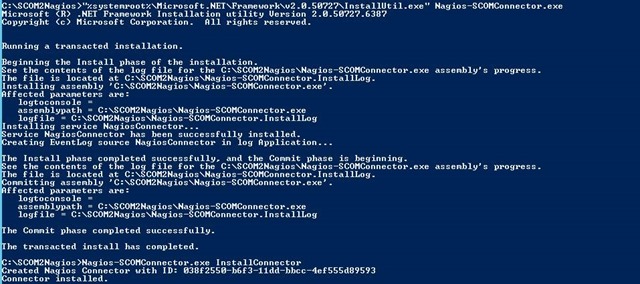
- start the Service Installer with “%systemroot%\Microsoft.NET\Framework\v2.0.50727\InstallUtil.exe” Nagios-SCOMConnector.exe (see the 1. screenshoot)
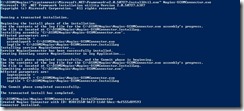
- Register the connector to SCOM with Nagios-SCOMConnector.exe InstallConnector
- Edit Nagios-SCOMConnector.exe.config and change the ncsaPath (2. screenshoot)
![clip_image002[4]](/wp-content/uploads/2013/04/clip_image0024_thumb.jpg "clip_image002[4]")
- Edit the service “KIT Nagios Connector” to Restart on Failure (3. Screenshoot)
![clip_image002[6]](/wp-content/uploads/2013/04/clip_image0026_thumb.jpg "clip_image002[6]")
- Select the connector in the OpsMgr Console (Administration –> Product Connectos –> Internal Connector, 4. Screenshoot)
![clip_image002[8]](/wp-content/uploads/2013/04/clip_image0028_thumb.jpg "clip_image002[8]")
- Right click the conenctor and select Properties (Screenshot 5)
![clip_image002[10]](/wp-content/uploads/2013/04/clip_image00210_thumb.jpg "clip_image002[10]")
- Add a suitable subscription to the connector to send alerts to it.
![clip_image002[12]](/wp-content/uploads/2013/04/clip_image00212_thumb.jpg "clip_image002[12]")
![clip_image002[4]](/wp-content/uploads/2013/04/clip_image0024.jpg "clip_image002[4]")
![clip_image002[6]](/wp-content/uploads/2013/04/clip_image0026.jpg "clip_image002[6]")
![clip_image002[8]](/wp-content/uploads/2013/04/clip_image0028.jpg "clip_image002[8]")
![clip_image002[10]](/wp-content/uploads/2013/04/clip_image00210.jpg "clip_image002[10]")
![clip_image002[12]](/wp-content/uploads/2013/04/clip_image00212.jpg "clip_image002[12]")
SCOM2Nagios: FAQ: Where can you find the subscription settings?
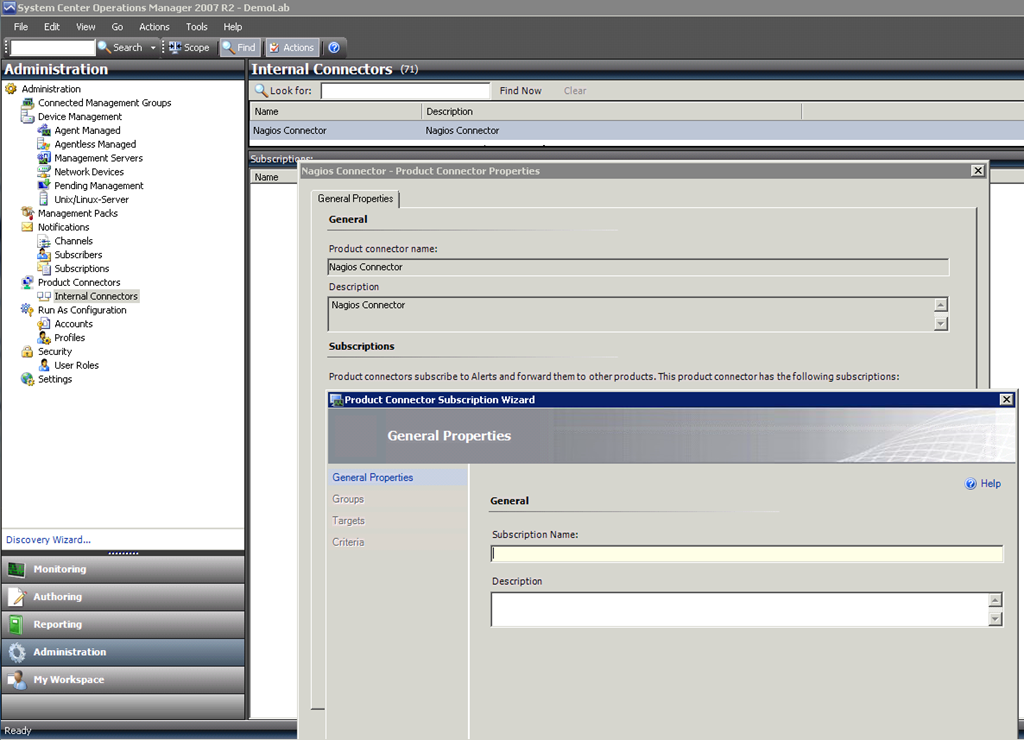
Hi, I had a question where you can find the settings for the automatic forwarded alerts to nagios in SCOM. You can find it here:
-
Administration Pane
-
Product Connectors –> Internal Connectors
-
Select the Nagios Connector
-
Properties
-
There you can add or edit subscription (the wizard is like the Notification Subscription Wizard)
Here is a screenshoot:
SCOM2Nagios 1.5
Find the newest version on top of: </tag/scom2nagios/>
Released a new Version of the SCOM2Nagios Connector. Changes:
1.5
- NEW: NagiosHost2 and NagiosPort2 in config (fast change upon request)
- BUG: Processings equals instruction hasnt’t worked correctly
This is currently a fast release without much testing. Please add a comment if anything is broken!
SCOM2Nagios 1.4
Find the newest version on top of: </tag/scom2nagios/>
Released a new Version of the SCOM2Nagios Connector. Changes:
1.4
- NEW: variables for processing instruction
- NEW: change case of output (upper/lower)
- BUG: no crash if scom connection is lost
- BUG: no longer needs fullpath in config
Example:
mcscom
If path contains mcscom than replace the host in the output with the upper case of the ObjectFullPath variable of the input alert.
SCOM2Nagios 1.3
Find the newest version on top of: </tag/scom2nagios/>
I have uploaded a release of the Nagios Connector 1.3. You can read about the changes in this post:
/2009/10/preinfo-nagios2scom-1-3/
I have only made some short and fast tests. So be cautious.
Download: SCOM2Nagios (141 downloads )
PreInfo: SCOM2Nagios 1.3
The new version is released here: /category/tools/scom2nagios/
The next release will address two feature requests:
- Possibility to change the hostname (you don’t use fqdn host names in nagios…)
- Possibility to use more than one service in nagios (you want to separate the alerts for dns and acitve directory)
I will try to solve both by using “processing instructions”. This instructions will use the scom alert as an input filter and the nagios alert as the object to manipulate.
SCOM2Nagios 1.2
Find the newest version on top of: </tag/scom2nagios/>
Attached is the new version of the SCOM2Nagios Connector.
There is just one small thing changed:
You can now define the OK message in config file. So no more german status messages in your nagios :-)
And thanks to Thomas Karatzoglou we now have an english installation instruction in the file.
Download Link: SCOM2Nagios (254 downloads )
FB_Addon_TelNo{ height:15px !important; white-space: nowrap !important; background-color: #0ff0ff;}
SCOM2Nagios Version 1.1
Find the newest version on top of: /category/tools/scom2nagios/
Anbei die Version 1.1 des Nagios Connectors. Er beinhaltet nur geringe Änderungen:
- Ausgabe der Versionsnummer in der Logdatei
- Detailliertere Logausgaben
- Fehler beim zweiten Nagios Server: er wurde in jedem Fall aufgerufen
Download: SCOM2Nagios_1.1
Erste Version des SCOM2Nagios Connectors
Achtung: Neue Version /2009/07/scom2nagios-version-1-1/
**Does anyone need an english version of the instruction? Then just post a comment.
**
In Absprache mit meinem früheren Chef habe ich den bereits vor längerer Zeit versprochenen SCOM2Nagios Connector aufgeräumt und in eine releasefähige Version verpackt.
Ich stelle ihn hiermit unter die GPL. Lizenzinformationen sind mit im Zip File enthalten.
Ein Wort der Warnung: Obwohl diese Version des Programms bei meinem früheren Arbeitgeber bereits im produktiven Umfeld lief, sollte er natürlich vorher ausgiebig in einer Testumgebung ausprobiert werden.
Connector SCOM -> Nagios
Find the newest version on top of: /category/tools/scom2nagios/
In meinem Umfeld ist Nagios als oberster Überwachungspunkt definiert worden. Daher hat sich bereits eine on mir betreute Diplomarbeit u.a. mit der Anbindung von SCOM an Nagios beschäftigt. Daraus hat sich ergeben, dass sich SCOM am Besten mittels send_ncsa anbinden lässt, da dieses Tool (das auch für Windows existiert) die Übertragung verschlüsseln kann und nicht auf Email (Verzögerung und was ist wenn man damit die Emailumgebung überwachen will?) bzw. snmp (wird von einigen als unsicher angesehen…) setzt.