Cloud Proxy mit ConfigMgr TP 1607 einrichten
Cloud Proxy ist eine neue Funktion in 1606 Technical Preview, die mobilen Geräten eine einfache Verbindung zum ConfigMgr ermöglicht. Dabei ist On-Premise keine DMZ notwendig.
Der Cloud Proxy wird durch den ConfigMgr selber installiert. Dazu muss der Server auf das entsprechende Azure Konto zugreifen können. Klassisch und auch in diesem Fall erfolgt dies über ein Management Zertifikat. Der Public Key dieses Schlüssels wird in Azure hochgeladen und jeder mit dem Privat Key kann administrativ auf das Konto zugreifen.
Managementzertifikat erstellen
SC 2012 SP1 Update Rollup 3 verfügbar
Vor zwei Tagen hat Microsoft das Update Rollup 3 für die System Center Familie verfügbar gemacht (alle Produkte außer ConfigMgr). Die Updates sind wie bei den letzten Rollups üblich auch in Windows Update auffindbar.
Hier der direkte Link zu der Beschreibung:
http://support.microsoft.com/kb/2836751/en-us
Beachtet bitte auch die Installationshinweise am Ende des Knowledge Base Artikels, da z.B. bei OpsMgr immer ein paar manuelle Schritte nötig sind bzw. bei SCVMM, der noch auf UR1 ist, das UR1 zuerst deinstalliert werden muss!
Step by Step instructions for the Nagios connector
Often I receive questions about how to install the connector. Here is a short step by step installation instruction:
- Download the latest release (/downloads/SCOM2Nagios_1.5.zip)
- Extract the archive
- Copy the “Release” folder to c:\
- rename it to scom2nagios
- Copy the “processing.xml” from documentation to c:\scom2nagios
- Start an administrative command shell
- change to c:\scom2nagios (cd /d c:\scom2nagios)
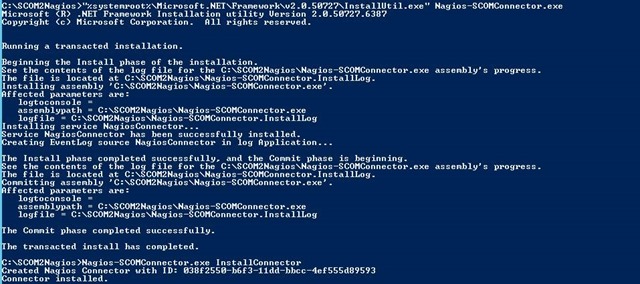
- start the Service Installer with “%systemroot%\Microsoft.NET\Framework\v2.0.50727\InstallUtil.exe” Nagios-SCOMConnector.exe (see the 1. screenshoot)
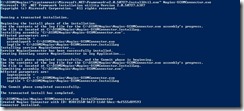
- Register the connector to SCOM with Nagios-SCOMConnector.exe InstallConnector
- Edit Nagios-SCOMConnector.exe.config and change the ncsaPath (2. screenshoot)
![clip_image002[4]](/wp-content/uploads/2013/04/clip_image0024_thumb.jpg "clip_image002[4]")
- Edit the service “KIT Nagios Connector” to Restart on Failure (3. Screenshoot)
![clip_image002[6]](/wp-content/uploads/2013/04/clip_image0026_thumb.jpg "clip_image002[6]")
- Select the connector in the OpsMgr Console (Administration –> Product Connectos –> Internal Connector, 4. Screenshoot)
![clip_image002[8]](/wp-content/uploads/2013/04/clip_image0028_thumb.jpg "clip_image002[8]")
- Right click the conenctor and select Properties (Screenshot 5)
![clip_image002[10]](/wp-content/uploads/2013/04/clip_image00210_thumb.jpg "clip_image002[10]")
- Add a suitable subscription to the connector to send alerts to it.
![clip_image002[12]](/wp-content/uploads/2013/04/clip_image00212_thumb.jpg "clip_image002[12]")
![clip_image002[4]](/wp-content/uploads/2013/04/clip_image0024.jpg "clip_image002[4]")
![clip_image002[6]](/wp-content/uploads/2013/04/clip_image0026.jpg "clip_image002[6]")
![clip_image002[8]](/wp-content/uploads/2013/04/clip_image0028.jpg "clip_image002[8]")
![clip_image002[10]](/wp-content/uploads/2013/04/clip_image00210.jpg "clip_image002[10]")
![clip_image002[12]](/wp-content/uploads/2013/04/clip_image00212.jpg "clip_image002[12]")
SCOM2Nagios: FAQ: Where can you find the subscription settings?
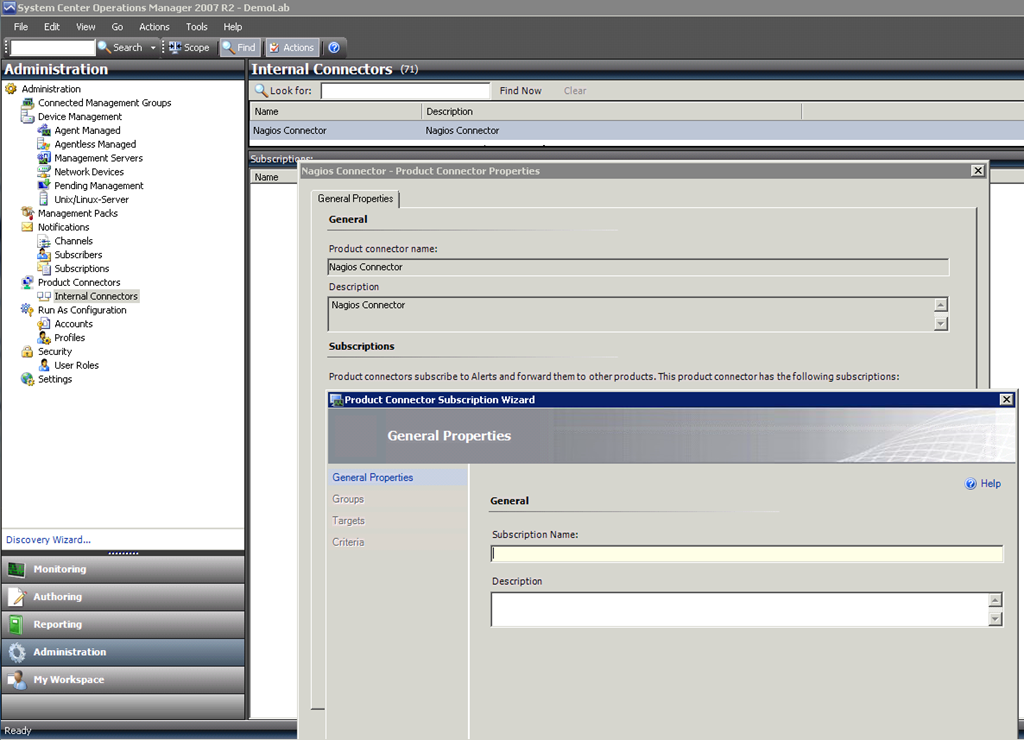
Hi, I had a question where you can find the settings for the automatic forwarded alerts to nagios in SCOM. You can find it here:
-
Administration Pane
-
Product Connectors –> Internal Connectors
-
Select the Nagios Connector
-
Properties
-
There you can add or edit subscription (the wizard is like the Notification Subscription Wizard)
Here is a screenshoot:
SCCM 2012: Neuerungen
Da ich momentan eine kleine Vortragsreihe zu Neuerungen in System Center 2012 halte, nutze ich die dabei herausgekommene Informationssammlung, um diese auch hier darzustellen:
Vereinfachter Site Aufbau:
- Keine Primary Sites unter Primary Sites mehr möglich
- Central Administration Site: kann genutzt werden, um mehrere Primary Sites zu verwalten
- SCCM ist jetzt komplett Unicode basierend, d.h. Management Konsole kann in mehreren Sprachen genutzt werden, keine ICPs mehr notwendig
- Replikation innerhalb der Hierarchie wird durch SQL Database Replication durchgeführt -> standardisierte Lösung, die schneller und robuster ist, als die alte filebasierte
- Bandbreitenbegrenzung jetzt direkt mit Distribution Points möglich, d.h. keine extra Secondary Sites notwendig
- Kein Mixed oder Native Mode mehr
- Innerhalb einer Site unterschiedliche zentrale Clienteinstellungen möglich
Es gibt in 95% der Fälle keinen Grund mehr für weitere Primäre oder Sekundäre Sites in SCCM
SCOM: Neue Management Packs Mitte Juli 2011
Diesmal gibt es ein paar interessante neue Management Packs (MP). Dazu zählt das MP für das BitLocker Administration and Monitoring (MBAM) aus dem Microsoft Desktop Optimization Pack (MDOP) und das MP für das CRM 2011.
Auch das Self Service Portal 2.0 hat jetzt ein MP bekommen:
Neue Management Packs im Zeitraum zwischen 26.06.2011 und 16.07.2011
SCOM2Nagios 1.4
Find the newest version on top of: </tag/scom2nagios/>
Released a new Version of the SCOM2Nagios Connector. Changes:
1.4
- NEW: variables for processing instruction
- NEW: change case of output (upper/lower)
- BUG: no crash if scom connection is lost
- BUG: no longer needs fullpath in config
Example:
mcscom
If path contains mcscom than replace the host in the output with the upper case of the ObjectFullPath variable of the input alert.
SCOM2Nagios 1.3
Find the newest version on top of: </tag/scom2nagios/>
I have uploaded a release of the Nagios Connector 1.3. You can read about the changes in this post:
/2009/10/preinfo-nagios2scom-1-3/
I have only made some short and fast tests. So be cautious.
Download: SCOM2Nagios (141 downloads )
OpenUMR – Cross Monitoring Integrator
If you not only want to connect OpsMgr to Nagios with my connector but other management systems to OpsMgr than the OpenUMR can perhaps help you.
It does more than just creating alerts in SCOM: it even creates the correct objects for the alerts.
More infos: http://openumr.codeplex.com/
SCOM2Nagios 1.2
Find the newest version on top of: </tag/scom2nagios/>
Attached is the new version of the SCOM2Nagios Connector.
There is just one small thing changed:
You can now define the OK message in config file. So no more german status messages in your nagios :-)
And thanks to Thomas Karatzoglou we now have an english installation instruction in the file.
Download Link: SCOM2Nagios (254 downloads )
FB_Addon_TelNo{ height:15px !important; white-space: nowrap !important; background-color: #0ff0ff;}