SCOM: Mime-encoded Detailansicht in der Konsole
Sehr selten kommt es vor, dass in der SCOM Konsole im Detailbereich nur Buchstabensalat angezeigt wird. Der Text ähnelt dann einer Email in der Quellcodeansicht.
From: Subject: srv.com Date: 7/7/2009 9:31:27 AM MIME-Version: 1.0 Content-Type: multipart/related; boundary="
=****=_NextPart_2cb688e489140fa2448a12bde7ba1e43"; type=“text/html” X-MimeOLE: Produced By Microsoft MimeOLE V6.00.2800.1106 This is a multi-part message in MIME format. —
==_NextPart_2cb688e489140fa2448a12bde7ba1e43 Content-Type: image/gif Content-Transfer-Encoding: base64 Content-Location: http://localhost/graypixel.gif R0lGODlhAQABAPAAAMDAwP///ywAAAAAAQABAAACAkQBADs= –==_NextPart_2cb688e489140fa2448a12bde7ba1e43 Content-Type: image/png Content-Transfer-Encoding: base64 Content-Location: http://localhost/source.gif […]3V5vwAAAABJRU5ErkJggg== —
ADDS: Nicht gelöschtes Profil beim Abmelden
 Probembeschreibung: In einigen sichereren Umgebungen sollen servergespeicherte Profile beim Abmelden gelöscht werden. Nach einem Upgrade auf IE8 war dies bei einem Kunden nicht mehr der Fall. Es blieben immer Reste von Anwendungsdateien zurück. Im Speziellen fiel dabei die index.dat vom IE8 auf.
Fehleranalyse: Um der Ursache auf den Grund zu gehen, wurde das Debugging bei der Profilverarbeitung erhöht: Aktivieren des Environment Debug Loggings von Winlogon (http://support.microsoft.com/kb/221833/en-us). Die dabei im Log gefundenen Fehler wurde an Google übergeben
Fehlermeldung bei der Installation des Visio Add-In for Disk Space
 Sollte bei der Installation des Visio Add-In for Disk Space (http://visiotoolbox.com/2010/add-ins.aspx) für den System Center Operations Manager (SCOM) auf einem Windows 7 x64 mit Visio 2010 x64 folgende Fehlermeldung auftauchen:
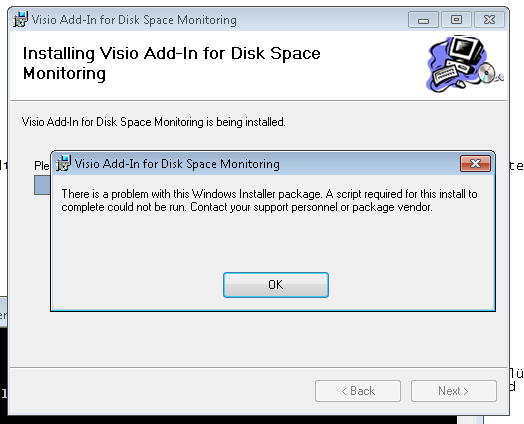
so liegt das laut dem Installer-Log (wenn man das Setup mit msiexec /I … /l* install.log aufruft) an einem fehlenden Registry Key:
SCOM ACS over forest borders
 Sometimes the acs forwarder doesn’t connects successfully to the acs server and states in the operations manager event log, that you have to activate debugging to see more details.
You can activate it by following this instruction:
- Browse to HKEY_LOCAL_MACHINE\SYSTEM\CurrentControlSet\Services\AdtAgent\Parameters
- Create DWORD value = TraceFlags
- Edit the TraceFlags entry and enter decimal value 524420
- Restart the AdtAgent service
(Source: http://helpmemanage.blogspot.com/2007/05/enable-detailed-logging-for-acs.html)
You can find the log under c:\windows\temp
One cause can be that the acs cannot operate over forest borders or from a workgroup (kerberos authentication – some reason for the scom agent).
Manual activate debug for GPP
Sometimes you have to debug group policy preferences (gpp) and don’t want to activate the debugging with another group policy.
You can simpe activate the debugging with two registry entries:
[HKEY_LOCAL_MACHINE\SOFTWARE\Policies\Microsoft\Windows\Group Policy\{728EE579-943C-4519-9EF7-AB56765798ED}]
"LogLevel"=dword:00000003
"TraceLevel"=dword:00000002
SCOM2Nagios 1.4
Find the newest version on top of: </tag/scom2nagios/>
Released a new Version of the SCOM2Nagios Connector. Changes:
1.4
- NEW: variables for processing instruction
- NEW: change case of output (upper/lower)
- BUG: no crash if scom connection is lost
- BUG: no longer needs fullpath in config
Example:
mcscom
If path contains mcscom than replace the host in the output with the upper case of the ObjectFullPath variable of the input alert.
Rollout von WinZip 12 mit SCCM
Hier mal eine kleine Batchdatei zur Verteilung von WinZip inkl. des Lizenzfiles:
@echo off
rem alte winzip version deinstallieren
MsiExec.exe /X{CD95F661-A5C4-44F5-A6AA-ECDD91C240B5} /l* %systemroot%\deinstall_winzip111.log /qn REBOOT=REALLYSUPPRESS
rem copy Lizenzfile to all Users profile
md “%ALLUSERSPROFILE%\WinZip”
copy /y “%~dp0winzip.wzmul” “%ALLUSERSPROFILE%\WinZip”
rem neue Version installieren:
rem Erklärung der Parameter:
rem /noqp = no quickpick icon in system tray
rem /notip = no tip of the day
rem /noc4u = don’t check for updates
OpsMgr ADDS 2003 Management Pack Bug
Heute konnte ich mir endlich die Zeit nehmen einen Alert im SCOM genauer zu betrachten. Obwohl über 2GB auf der NTDS Platte des DCs frei waren und die Subdomäne nur eine Datenbankgröße von 512MB hat, meldete SCOM regelmäßig, dass die Platte zu voll sei.
In diesem Fall sieht die Berechnung folgendermaßen aus:
Name der Regel im MP: AD Database Drive Free Collection
Aktuelle Größen:
ntds.dit: 454672 kbytes
ntds.logs: 10240 kbytes (das MP Skript betrachtet nur das edb.log File)